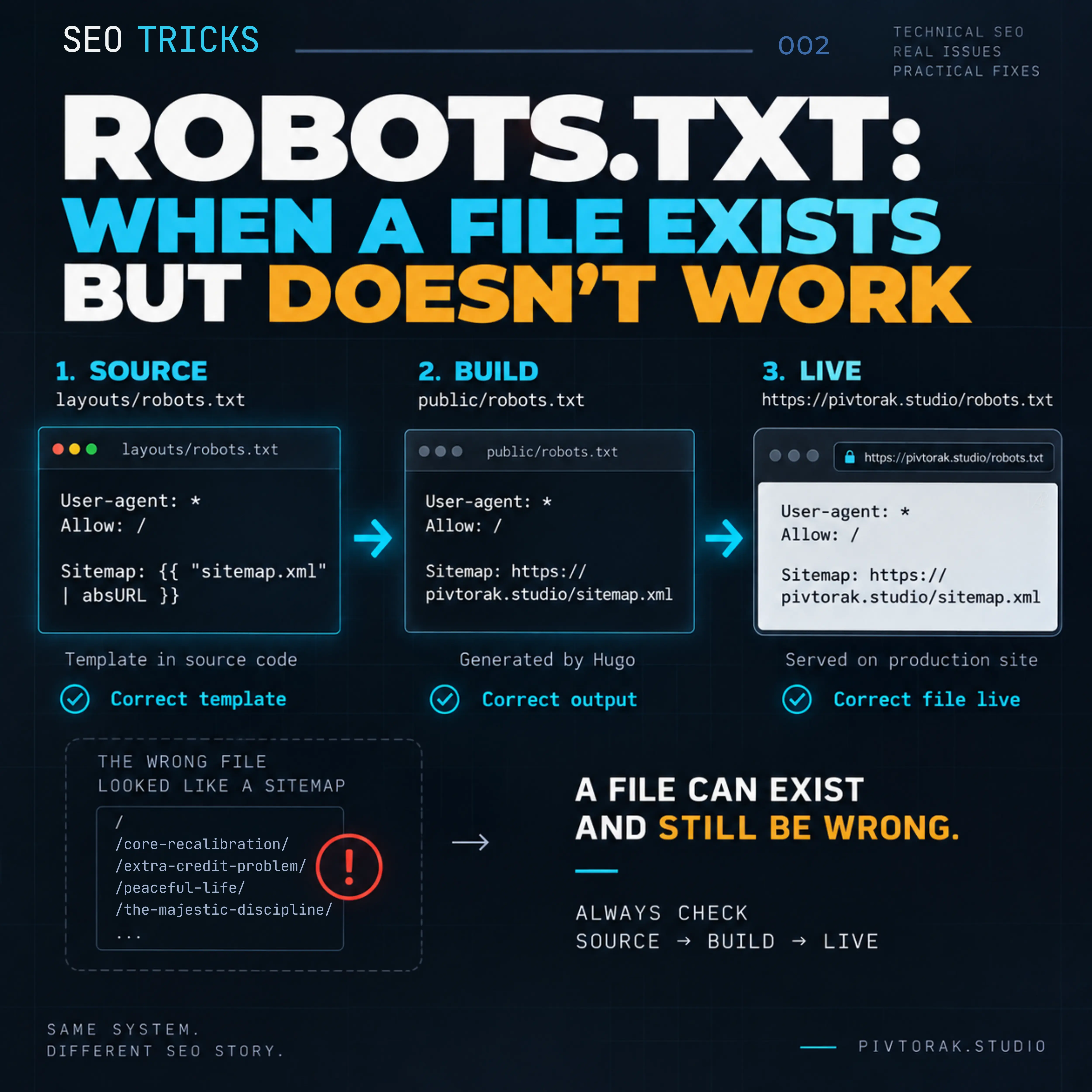
Robots.txt: When a File Exists but Doesn’t Work | SEO Tricks#
The file was there. The URL was correct. The server returned it. And yet — it was not doing what robots.txt was supposed to do.
Quick Summary Box#
A
robots.txtfile can exist at the correct URL and still be wrong.In this case, Hugo generated
/robots.txt, but the resulting file was about 34 KB and contained a long list of site pages instead of robots directives. The investigation traced the unexpected output to Hugo’s template lookup and a catch-allall.txttemplate in thehugo-booktheme.The fix was simple: create an explicit
layouts/robots.txttemplate, then verify the result through Source → Build → Live.
The Question#
What happens when robots.txt exists at the correct URL, but its actual content is wrong?
That was the question behind this investigation. After enableRobotsTXT = true was confirmed in the Hugo configuration, the expected /robots.txt was generated — but its content was not a valid robots file.
The problem was no longer whether the file existed. The problem was what Hugo had actually generated.
Why It Matters#
For a technical file such as robots.txt, an HTTP 200 response or the mere existence of the file is not enough.
Its content must perform the intended function. If the generated output is unexpected, checking only the URL can hide the actual problem.
In this case, the investigation was therefore focused on the generated content, its source template, and the path from Hugo configuration to the final file.
We did not measure any specific impact on crawling, indexing, or rankings, so this investigation does not claim that the incorrect file caused such effects.
The Check#
The investigation started with the live URL:
https://pivtorak.studio/robots.txtThe first check showed:
404 File not foundAt the same time, the site’s sitemap was available. This made the next question more specific: why was Hugo not producing the expected robots.txt?
1. Check the Hugo configuration#
The site’s hugo.toml was inspected first.
The configuration contained:
enableRobotsTXT = trueSo Hugo was explicitly configured to generate a robots.txt file.
2. Check for an explicit robots template#
The next step was to look for a template that could define the content of that file.
We checked:
layouts/robots.txt
themes/hugo-book/layouts/robots.txt
static/robots.txt
None of these files existed.
At this point, the source configuration said that Hugo should generate robots.txt, but there was no explicit robots.txt template in the project or in the expected theme location.
3. Build the site#
The site was then built locally:
hugoThe build produced:
public/robots.txtThis was an important finding — but it was not yet a successful result.
The generated file was approximately 34 KB.
Instead of a small set of robots directives, it contained:
Pivtorak.Studio
- ...
followed by a long list of pages from the site.
So the investigation changed from:
Why is robots.txt missing?to:
Why is Hugo generating this content as robots.txt?4. Inspect the template lookup#
The investigation then moved into the Hugo theme.
A relevant file was found at:
themes/hugo-book/layouts/all.txtThis was the unexpected template involved in the generated output.
The resulting technical chain was:
enableRobotsTXT = true
        ↓
Hugo generates robots output
        ↓
output type: text/plain
        ↓
template lookup
        ↓
no explicit robots.txt template
        ↓
all.txt is matched
        ↓
unexpected content becomes /robots.txt
The important point is that the generated file was not random or corrupted. Hugo was successfully generating an output file — it was using the wrong template for the intended purpose.
5. Stop before deployment#
At this stage, the generated public/robots.txt was not committed or deployed.
The file existed.
The build succeeded.
But the content was wrong.
That distinction became the central finding of the investigation:
A successful build does not prove that the generated file is correct.
The source, the generated output, and only then the live website all had to be checked.
What We Found#
The investigation established that the problem was not simply that robots.txt was missing.
The more important finding was this:
Hugo was generating a file at the expected path — but the generated content was coming from the wrong template.
Expected vs. Observed#
| Check | Expected | Observed | Evidence |
|---|---|---|---|
Live /robots.txt |
A valid robots file | Initially returned 404 |
Live URL check |
| Hugo configuration | enableRobotsTXT = true |
Confirmed | hugo.toml |
| Explicit robots template | layouts/robots.txt or another intended source |
Not present | Source inspection |
| Local build | public/robots.txt with robots directives |
File was generated, but was ~34 KB | hugo build |
| Generated content | User-agent, Allow, Sitemap, etc. |
Pivtorak.Studio followed by a long page/URL list |
Generated public/robots.txt |
| Template investigation | A robots-specific template should control the output | themes/hugo-book/layouts/all.txt was matched |
Theme inspection |
The key evidence was the generated file itself.
Its existence proved that Hugo was producing the requested output. Its content proved that the output was not functioning as intended.
The unexpected template#
The investigation identified:
themes/hugo-book/layouts/all.txtas the unexpected template involved in the result.
The research also recorded Hugo’s robots output as text/plain and the relevant template lookup behavior.
The technical chain was therefore:
hugo.toml
enableRobotsTXT = true
        │
        ▼
Hugo robots output
        │
        ▼
text/plain
        │
        ▼
Template lookup
        │
        ├── no explicit layouts/robots.txt
        │
        ▼
themes/hugo-book/layouts/all.txt
        │
        ▼
34 KB generated output
        │
        ▼
Wrong /robots.txt content
This explains an important distinction:
The build was successful from Hugo’s point of view. The result was unsuccessful from the point of view of the intended file function.
What the evidence allowed us to conclude#
We could confirm all of the following:
enableRobotsTXT = truewas present.- No explicit
robots.txttemplate was present in the checked locations. - Hugo generated
public/robots.txtduring the local build. - The generated file was approximately 34 KB.
- Its content consisted of site-related text and a long list of pages/URLs rather than the expected robots directives.
- The investigation identified
themes/hugo-book/layouts/all.txtas the unexpected template involved in that output. - The incorrect generated file was detected before commit and deployment.
Therefore, the root cause established by the investigation was:
Hugo robots output
        ↓
template lookup
        ↓
catch-all all.txt
        ↓
unexpected content
        ↓
wrong robots.txt
What we did not establish#
The investigation did not measure a specific effect on:
- crawl budget;
- indexing;
- search rankings;
- organic traffic.
Those effects therefore should not be presented as consequences of this particular incident.
What we actually demonstrated was narrower and more useful:
A file can exist at the correct URL, be successfully generated by the build, and still contain the wrong output.
That is why the existence check alone was not enough — the generated content had to be inspected before deployment.
The Fix#
The fix was deliberately simple: instead of relying on Hugo’s template lookup to determine what should become /robots.txt, we created an explicit template for this file.
1. Create an explicit robots template#
A new file was added:
layouts/robots.txtwith the following content:
User-agent: *
Allow: /

Sitemap: {{ "sitemap.xml" | absURL }}
This makes the intended output explicit.
User-agent: *applies the rules to all crawlers.Allow: /allows crawling of the site.Sitemap:provides the absolute URL of the generated sitemap.
The important part is not adding more directives. It is taking control of the template that generates /robots.txt.
2. Why this solves the problem#
Before the fix, the generation path was:
enableRobotsTXT = true
        │
        ▼
Hugo robots output
        │
        ▼
Template lookup
        │
        ▼
themes/hugo-book/layouts/all.txt
        │
        ▼
Wrong content
        │
        ▼
/robots.txt
After the fix:
enableRobotsTXT = true
        │
        ▼
Hugo robots output
        │
        ▼
layouts/robots.txt
        │
        ▼
Explicit robots directives
        │
        ▼
/robots.txt
The key change is the addition of:
layouts/robots.txtIt removes the ambiguity that allowed the generic all.txt template to be used for this output.
3. The complete template#
For reproducibility, the complete file is:
User-agent: *
Allow: /

Sitemap: {{ "sitemap.xml" | absURL }}
The sitemap URL is generated dynamically with Hugo’s absURL function rather than hard-coding the production domain.
4. One important rule#
The fix was not deployed immediately.
The new template had to be verified locally first:
Source → BuildOnly after the generated public/robots.txt contained the expected robots directives was the result moved to:
Build → LiveThis preserves the central lesson of the incident:
Do not deploy a fix merely because the source code looks correct. Verify the generated output first.
Verification#
The fix was verified at three levels:
Source → Build → Live
Each level answered a different question:
| Level | Question | Result |
|---|---|---|
| Source | Is the intended robots template present? | Yes — layouts/robots.txt was created with the expected directives. |
| Build | Does Hugo generate the correct file? | Yes — the generated public/robots.txt contained the expected robots directives. |
| Live | Did the corrected file reach the production site? | Yes — the live /robots.txt returned the corrected content. |
1. Source#
The source was checked first.
The new file:
layouts/robots.txtcontained:
User-agent: *
Allow: /

Sitemap: {{ "sitemap.xml" | absURL }}
At this stage, the question was simply:
Is the intended source template correct and present in the expected location?
Yes.
But source code alone was not considered sufficient evidence.
2. Build#
The site was then built locally with:
hugoThe generated file:
public/robots.txtwas inspected directly.
The important change was that the generated output now contained robots directives rather than the previous site-wide page listing.
Expected generated content:
User-agent: *
Allow: /

Sitemap: https://pivtorak.studio/sitemap.xml
This established that the source template was actually producing the intended output.
The verification sequence therefore moved from:
Source → Build
only after the generated file had been inspected.
3. Live#
Only after the local build produced the correct result was the change deployed.
The production URL was then checked:
https://pivtorak.studio/robots.txtThe final live response was:
User-agent: *
Allow: /

Sitemap: https://pivtorak.studio/sitemap.xml
This confirmed that the corrected generated file had reached the live site.
4. Deployment evidence#
The deployment is also traceable through the project history:
Commit: 8c98ac0a
GitHub Actions run: #2739
Status: successful deployment
This provides an additional link between the verified source change and the live result.
Verification chain#
SOURCE
layouts/robots.txt
        │
        ▼
BUILD
public/robots.txt
        │
        ▼
LIVE
https://pivtorak.studio/robots.txt
        │
        ▼
Correct robots directives
What this verification proves#
The verification establishes that:
- the intended source template exists;
- Hugo generates the expected
robots.txt; - the generated file was deployed;
- the live URL returns the corrected content.
It does not by itself establish any subsequent change in crawling, indexing, rankings, or organic traffic.
Those would require separate measurements over time.
A successful technical fix is verified when the intended source produces the intended build output — and that output is confirmed on the live site.
Final Takeaway#
A robots.txt problem is not always a missing file.
Sometimes the file exists.
Sometimes Hugo builds it successfully.
And sometimes it is still the wrong file.
The essential lesson from this incident is simple:
Do not verify only that
/robots.txtexists. Verify what actually generated it, what Hugo built, and what the live site serves.
The reliable sequence is:
Source → Build → Live
In this case, an explicit layouts/robots.txt template removed the ambiguity, the local build confirmed the generated output, and the live URL confirmed the final result.
The file was not fixed merely by making it exist.
It was fixed by making its source, generated output, and live content agree with its intended function.
Final Thought#
A successful build is not the same as a correct result.
Always inspect the file that actually reaches the web.
robots.txt · Hugo · technical SEO · template lookup · site verification
Alt-text:
A dark technical illustration showing a website robots.txt investigation, with code, template paths, and a verification flow from source to build to live site.
SEO Tricks. Robots.txt: When a File Exists but Doesn’t Work . AP | Pivtorak.Studio. 22.09.2026
© Anna Pivtorak (Kostyuk)